
Transformers documentation
SAM
该模型于 2023-04-05 在 HF papers 上发布,并于 2023-04-19 贡献至 Hugging Face Transformers。
SAM
概述
SAM(Segment Anything Model)由 Alexander Kirillov、Eric Mintun、Nikhila Ravi、Hanzi Mao、Chloe Rolland、Laura Gustafson、Tete Xiao、Spencer Whitehead、Alex Berg、Wan-Yen Lo、Piotr Dollar 和 Ross Girshick 在 Segment Anything 中提出。
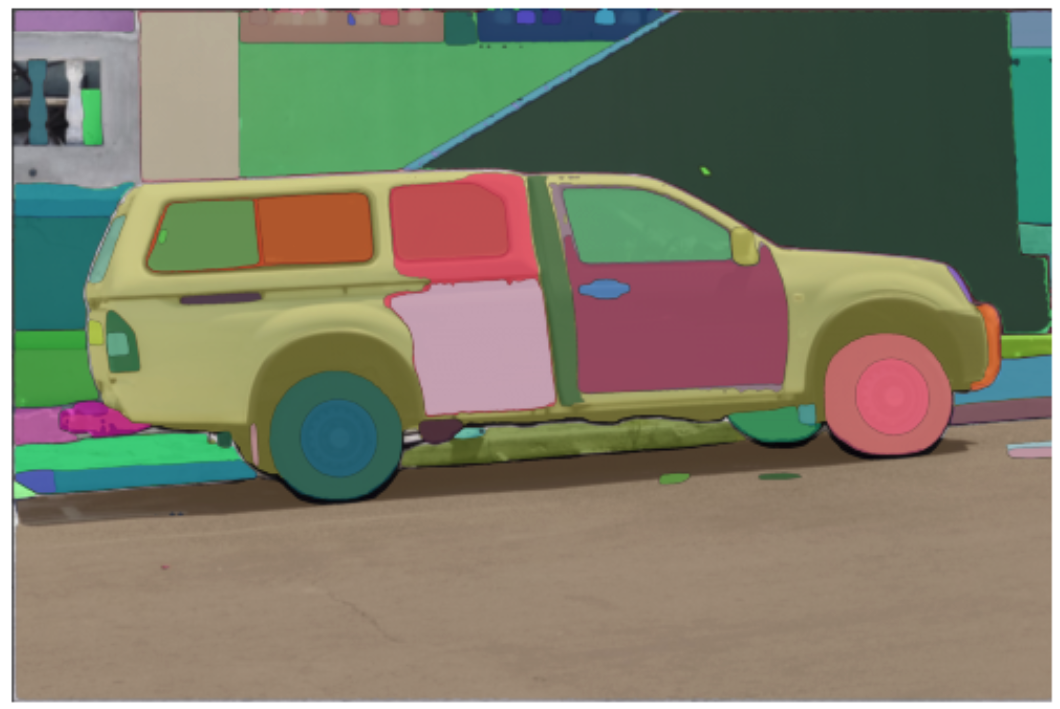
给定一张输入图像,该模型可用于预测任意感兴趣对象的分割掩码。
该论文的摘要如下:
我们推出了 Segment Anything(SA)项目:一项用于图像分割的新任务、新模型和新数据集。利用我们的高效模型进行数据收集,我们构建了迄今为止规模最大的分割数据集(遥遥领先),包含超过 10 亿个掩码,覆盖 1100 万张具有授权且尊重隐私的图像。该模型经过专门设计和训练,支持提示(promptable),因此可以零样本迁移到新的图像分布和任务中。我们在众多任务上评估了其能力,发现其零样本性能令人印象深刻——通常与以往的完全监督结果相当,甚至更优。我们在 https://segment-anything.com 发布了 Segment Anything Model(SAM)以及包含 10 亿个掩码和 1100 万张图像的数据集(SA-1B),以促进计算机视觉基础模型的研究。
提示:
- 该模型预测二值掩码,用于指示给定图像中目标对象是否存在。
- 如果提供 2D 输入点和/或输入边界框,模型的预测结果会好得多
- 您可以为同一图像提示多个点,并预测单个掩码。
- 目前尚不支持微调模型
- 根据论文,文本输入也应得到支持。然而,截至本文撰写之时,官方仓库似乎尚未支持该功能。
该模型由 ybelkada 和 ArthurZ 贡献。 原始代码可在此处找到。
以下示例展示了如何根据图像和 2D 点运行掩码生成:
import requests
import torch
from PIL import Image

from transformers import SamModel, SamProcessor


model = SamModel.from_pretrained("facebook/sam-vit-huge", device_map="auto")
processor = SamProcessor.from_pretrained("facebook/sam-vit-huge")

img_url = "https://huggingface.co/ybelkada/segment-anything/resolve/main/assets/car.png"
raw_image = Image.open(requests.get(img_url, stream=True).raw).convert("RGB")
input_points = [[[450, 600]]]  # 2D location of a window in the image

inputs = processor(raw_image, input_points=input_points, return_tensors="pt").to(model.device)
with torch.no_grad():
    outputs = model(**inputs)

masks = processor.image_processor.post_process_masks(
    outputs.pred_masks.cpu(), inputs["original_sizes"].cpu(), inputs["reshaped_input_sizes"].cpu()
)
scores = outputs.iou_scores
您也可以在处理器中同时处理输入图像和自定义掩码,并将其传递给模型。
import requests
import torch
from PIL import Image

from transformers import SamModel, SamProcessor


model = SamModel.from_pretrained("facebook/sam-vit-huge", device_map="auto")
processor = SamProcessor.from_pretrained("facebook/sam-vit-huge")

img_url = "https://huggingface.co/ybelkada/segment-anything/resolve/main/assets/car.png"
raw_image = Image.open(requests.get(img_url, stream=True).raw).convert("RGB")
mask_url = "https://huggingface.co/ybelkada/segment-anything/resolve/main/assets/car.png"
segmentation_map = Image.open(requests.get(mask_url, stream=True).raw).convert("1")
input_points = [[[450, 600]]]  # 2D location of a window in the image

inputs = processor(raw_image, input_points=input_points, segmentation_maps=segmentation_map, return_tensors="pt").to(model.device)
with torch.no_grad():
    outputs = model(**inputs)

masks = processor.image_processor.post_process_masks(
    outputs.pred_masks.cpu(), inputs["original_sizes"].cpu(), inputs["reshaped_input_sizes"].cpu()
)
scores = outputs.iou_scores
资源
一份来自 Hugging Face 官方和社区(以 🌎 标识)的资源列表,帮助你快速上手 SAM。
- 用于使用该模型的演示笔记本。
- 用于自动掩码生成流水线的演示笔记本。
- 用于 MedSAM 推理的演示笔记本,MedSAM 是 SAM 在医疗领域的微调版本。🌎
- 用于在自定义数据上微调模型的演示笔记本。🌎
SlimSAM
SlimSAM 是 SAM 的剪枝版本,由 Zigeng Chen 等人在 0.1% Data Makes Segment Anything Slim 中提出。SlimSAM 在保持相同性能的同时,大幅减小了 SAM 模型的体积。
可以在 hub 上找到检查点,它们可以作为 SAM 的直接替代品使用。
Grounded SAM
可以将 Grounding DINO 与 SAM 结合,实现基于文本的掩码生成,如 Grounded SAM: Assembling Open-World Models for Diverse Visual Tasks 中所述。有关详细信息,请参阅此 演示笔记本 🌍。
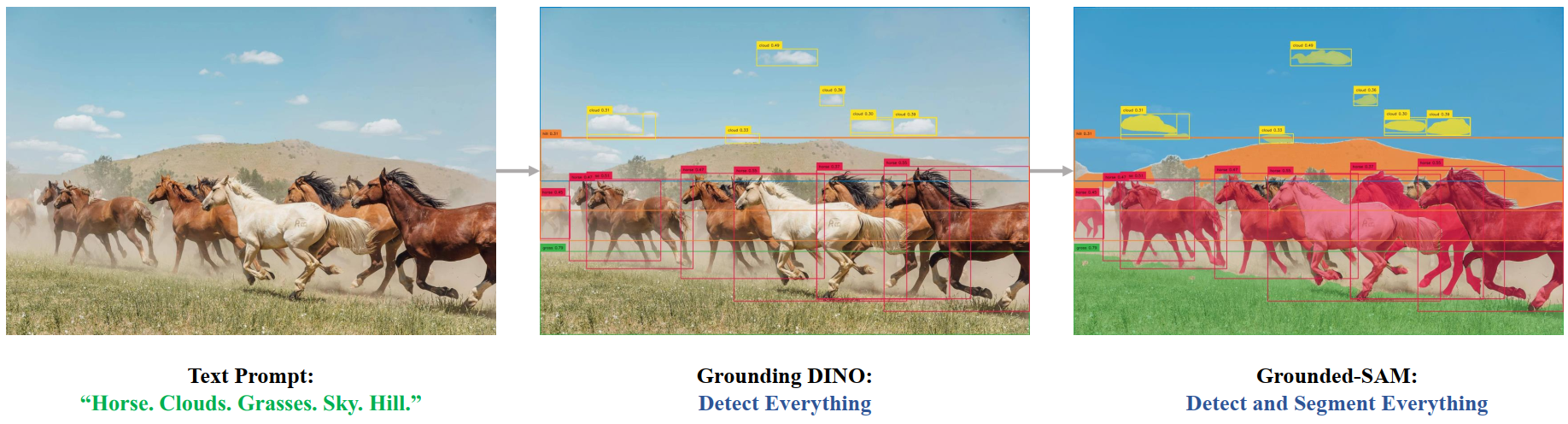 Grounded SAM overview. Taken from the original repository.
SamConfig
class transformers.SamConfig
< source >( transformers_version: str | None = Nonearchitectures: list[str] | None = Noneoutput_hidden_states: bool | None = Falsereturn_dict: bool | None = Truedtype: str | torch.dtype | None = Nonechunk_size_feed_forward: int = 0is_encoder_decoder: bool = Falseid2label: dict[int, str] | dict[str, str] | None = Nonelabel2id: dict[str, int] | dict[str, str] | None = Noneproblem_type: Literal['regression', 'single_label_classification', 'multi_label_classification'] | None = Nonevision_config: dict | transformers.configuration_utils.PreTrainedConfig | None = Noneprompt_encoder_config: dict | transformers.configuration_utils.PreTrainedConfig | None = Nonemask_decoder_config: dict | transformers.configuration_utils.PreTrainedConfig | None = Noneinitializer_range: float = 0.02tie_word_embeddings: bool = True )
参数
- vision_config (
Union[dict, ~configuration_utils.PreTrainedConfig],可选) — 视觉骨干网络的配置对象或字典。 - prompt_encoder_config (Union[
dict,SamPromptEncoderConfig], 可选) — 用于初始化 SamPromptEncoderConfig 的配置选项字典。 - mask_decoder_config (Union[
dict,SamMaskDecoderConfig], 可选) — 用于初始化 SamMaskDecoderConfig 的配置选项字典。 - initializer_range (
float,可选,默认为0.02) — 用于初始化所有权重矩阵的 truncated_normal_initializer 的标准差。 - tie_word_embeddings (
bool,可选,默认为True) — 是否根据模型的tied_weights_keys映射来绑定权重嵌入。
这是用于存储 SamModel 配置的类。它根据指定的参数实例化 Sam 模型,并定义模型架构。使用默认值实例化配置,将得到与 facebook/sam-vit-huge 类似的配置。
配置对象继承自 PreTrainedConfig,可用于控制模型输出。有关更多信息,请参阅 PreTrainedConfig 的文档。
示例:
>>> from transformers import (
...     SamVisionConfig,
...     SamPromptEncoderConfig,
...     SamMaskDecoderConfig,
...     SamModel,
... )

>>> # Initializing a SamConfig with `"facebook/sam-vit-huge"` style configuration
>>> configuration = SamConfig()

>>> # Initializing a SamModel (with random weights) from the `"facebook/sam-vit-huge"` style configuration
>>> model = SamModel(configuration)

>>> # Accessing the model configuration
>>> configuration = model.config

>>> # We can also initialize a SamConfig from a SamVisionConfig, SamPromptEncoderConfig, and SamMaskDecoderConfig

>>> # Initializing SAM vision, SAM Q-Former and language model configurations
>>> vision_config = SamVisionConfig()
>>> prompt_encoder_config = SamPromptEncoderConfig()
>>> mask_decoder_config = SamMaskDecoderConfig()

>>> config = SamConfig(vision_config, prompt_encoder_config, mask_decoder_config)
SamVisionConfig
class transformers.SamVisionConfig
< source >( transformers_version: str | None = Nonearchitectures: list[str] | None = Noneoutput_hidden_states: bool | None = Falsereturn_dict: bool | None = Truedtype: str | torch.dtype | None = Nonechunk_size_feed_forward: int = 0is_encoder_decoder: bool = Falseid2label: dict[int, str] | dict[str, str] | None = Nonelabel2id: dict[str, int] | dict[str, str] | None = Noneproblem_type: Literal['regression', 'single_label_classification', 'multi_label_classification'] | None = Nonehidden_size: int = 768output_channels: int = 256num_hidden_layers: int = 12num_attention_heads: int = 12num_channels: int = 3image_size: int | list[int] | tuple[int, int] = 1024patch_size: int | list[int] | tuple[int, int] = 16hidden_act: str = 'gelu'layer_norm_eps: float = 1e-06attention_dropout: float | int = 0.0initializer_range: float = 1e-10qkv_bias: bool = Truemlp_ratio: float = 4.0use_abs_pos: bool = Trueuse_rel_pos: bool = Truewindow_size: int = 14global_attn_indexes: list[int] | tuple[int, ...] = (2, 5, 8, 11)num_pos_feats: int = 128mlp_dim: int | None = None )
参数
- hidden_size (
int,可选,默认为768) — 隐藏表示的维度。 - output_channels (
int, 可选,默认为 256) — Patch Encoder 中输出通道的维度。 - num_hidden_layers (
int, 可选, 默认为12) — Transformer 解码器中的隐藏层数量。 - num_attention_heads (
int,可选,默认为12) — Transformer 解码器中每个注意力层的注意力头数量。 - num_channels (
int,可选,默认为3) — 输入通道的数量。 - image_size (
Union[int, list[int], tuple[int, int]],可选,默认为1024) — 每张图片的尺寸(分辨率)。 - patch_size (
Union[int, list[int], tuple[int, int]],可选,默认为16) — 每个 patch 的大小(分辨率)。 - hidden_act (
str,可选,默认为gelu) — 解码器中的非线性激活函数(函数或字符串)。例如,"gelu"、"relu"、"silu"等。 - layer_norm_eps (
float,可选,默认为1e-06) — 层归一化层所使用的 epsilon 值。 - attention_dropout (
Union[float, int],可选,默认为0.0) — 注意力概率的 dropout 比率。 - initializer_range (
float,可选,默认为1e-10) — 用于初始化所有权重矩阵的 truncated_normal_initializer 的标准差。 - qkv_bias (
bool,可选,默认为True) — 是否向查询、键和值添加偏置。 - mlp_ratio (
float,可选,默认为4.0) — MLP 隐藏层维度与嵌入维度的比值。 - use_abs_pos (
bool,可选,默认为True) — 是否使用绝对位置嵌入。 - use_rel_pos (
bool,可选,默认为True) — 是否使用相对位置嵌入。 - window_size (
int,可选,默认为 14) — 相对位置的窗口大小。 - global_attn_indexes (
list[int],可选,默认为[2, 5, 8, 11]) — 全局注意力层的索引。 - num_pos_feats (
int,可选,默认为 128) — 位置嵌入的维度。 - mlp_dim (
int, 可选) — Transformer 编码器中 MLP 层的维度。如果为None,则默认为mlp_ratio * hidden_size。
这是用于存储 SamModel 配置的类。它根据指定的参数实例化 Sam 模型,并定义模型架构。使用默认值实例化配置,将得到与 facebook/sam-vit-huge 类似的配置。
配置对象继承自 PreTrainedConfig,可用于控制模型输出。有关更多信息,请参阅 PreTrainedConfig 的文档。
示例:
>>> from transformers import (
...     SamVisionConfig,
...     SamVisionModel,
... )

>>> # Initializing a SamVisionConfig with `"facebook/sam-vit-huge"` style configuration
>>> configuration = SamVisionConfig()

>>> # Initializing a SamVisionModel (with random weights) from the `"facebook/sam-vit-huge"` style configuration
>>> model = SamVisionModel(configuration)

>>> # Accessing the model configuration
>>> configuration = model.config
SamMaskDecoderConfig
class transformers.SamMaskDecoderConfig
< source >( transformers_version: str | None = Nonearchitectures: list[str] | None = Noneoutput_hidden_states: bool | None = Falsereturn_dict: bool | None = Truedtype: str | torch.dtype | None = Nonechunk_size_feed_forward: int = 0is_encoder_decoder: bool = Falseid2label: dict[int, str] | dict[str, str] | None = Nonelabel2id: dict[str, int] | dict[str, str] | None = Noneproblem_type: Literal['regression', 'single_label_classification', 'multi_label_classification'] | None = Nonehidden_size: int = 256hidden_act: str = 'relu'mlp_dim: int = 2048num_hidden_layers: int = 2num_attention_heads: int = 8attention_downsample_rate: int = 2num_multimask_outputs: int = 3iou_head_depth: int = 3iou_head_hidden_dim: int = 256layer_norm_eps: float = 1e-06 )
参数
- hidden_size (
int,可选,默认为256) — 隐藏表示的维度。 - hidden_act (
str,可选,默认为relu) — 解码器中的非线性激活函数(函数或字符串)。例如,"gelu"、"relu"、"silu"等。 - mlp_dim (
int,可选,默认值为 2048) — Transformer 编码器中“中间”(即前馈)层的维度。 - num_hidden_layers (
int,可选,默认为2) — Transformer 解码器中的隐藏层数。 - num_attention_heads (
int,可选,默认为8) — Transformer 解码器中每个注意力层的注意力头数量。 - attention_downsample_rate (
int,可选,默认为 2) — 注意力层的下采样率。 - num_multimask_outputs (
int,可选,默认为 3) —SamMaskDecoder模块的输出数量。在 Segment Anything 论文中,该值被设置为 3。 - iou_head_depth (
int,可选,默认为 3) — IoU 头模块中的层数。 - iou_head_hidden_dim (
int,可选,默认为 256) — IoU 头模块中隐藏状态的维度。 - layer_norm_eps (
float,可选,默认为1e-06) — 层归一化层所使用的 epsilon 值。
这是用于存储 SamModel 配置的类。它根据指定的参数实例化 Sam 模型,并定义模型架构。使用默认值实例化配置,将得到与 facebook/sam-vit-huge 类似的配置。
配置对象继承自 PreTrainedConfig,可用于控制模型输出。有关更多信息,请参阅 PreTrainedConfig 的文档。
SamPromptEncoderConfig
class transformers.SamPromptEncoderConfig
< source >( transformers_version: str | None = Nonearchitectures: list[str] | None = Noneoutput_hidden_states: bool | None = Falsereturn_dict: bool | None = Truedtype: str | torch.dtype | None = Nonechunk_size_feed_forward: int = 0is_encoder_decoder: bool = Falseid2label: dict[int, str] | dict[str, str] | None = Nonelabel2id: dict[str, int] | dict[str, str] | None = Noneproblem_type: Literal['regression', 'single_label_classification', 'multi_label_classification'] | None = Nonehidden_size: int = 256image_size: int | list[int] | tuple[int, int] = 1024patch_size: int | list[int] | tuple[int, int] = 16mask_input_channels: int = 16num_point_embeddings: int = 4hidden_act: str = 'gelu'layer_norm_eps: float = 1e-06 )
参数
- hidden_size (
int,可选,默认为256) — 隐藏表示的维度。 - image_size (
Union[int, list[int], tuple[int, int]],可选,默认为1024) — 每张图片的尺寸(分辨率)。 - patch_size (
Union[int, list[int], tuple[int, int]],可选,默认为16) — 每个 patch 的大小(分辨率)。 - mask_input_channels (
int,可选,默认为 16) — 输入到MaskDecoder模块的通道数。 - num_point_embeddings (
int,可选,默认为 4) — 要使用的点嵌入数量。 - hidden_act (
str,可选,默认为gelu) — 解码器中的非线性激活函数(函数或字符串)。例如,"gelu"、"relu"、"silu"等。 - layer_norm_eps (
float,可选,默认为1e-06) — 层归一化层所使用的 epsilon 值。
这是用于存储 SamModel 配置的类。它根据指定的参数实例化 Sam 模型,并定义模型架构。使用默认值实例化配置,将得到与 facebook/sam-vit-huge 类似的配置。
配置对象继承自 PreTrainedConfig,可用于控制模型输出。有关更多信息,请参阅 PreTrainedConfig 的文档。
SamProcessor
class transformers.SamProcessor
< source >( image_processor )
构建一个 SamProcessor,将图像处理器封装为单一处理器。
SamProcessor 提供了 SamImageProcessor 的所有功能。有关更多信息,请参阅 ~SamImageProcessor。
__call__
< source >( images: typing.Union[ForwardRef('PIL.Image.Image'), numpy.ndarray, ForwardRef('torch.Tensor'), list['PIL.Image.Image'], list[numpy.ndarray], list['torch.Tensor'], NoneType] = Nonetext: str | list[str] | list[list[str]] | None = None**kwargs ) → ~tokenization_utils_base.BatchEncoding
参数
- images (
Union[PIL.Image.Image, numpy.ndarray, torch.Tensor, list[PIL.Image.Image], list[numpy.ndarray], list[torch.Tensor]], 可选) — 要预处理的图像。期望输入单张图像或一批图像,其像素值范围为 0 到 255。如果传入的图像像素值在 0 到 1 之间,请设置do_rescale=False。 - text (
Union[str, list[str], list[list[str]]],可选) — 要编码的序列或序列批次。每个序列可以是字符串或字符串列表(预分词字符串)。如果传入预分词输入,请设置is_split_into_words=True,以避免与批量输入产生歧义。 - return_tensors (
str或 TensorType, 可选) — 如果设置,将返回特定框架的张量。可接受的值为:'pt':返回 PyTorchtorch.Tensor对象。'np':返回 NumPynp.ndarray对象。
返回值
~tokenization_utils_base.BatchEncoding
- data (
dict,可选) — 由__call__/encode_plus/batch_encode_plus方法返回的列表/数组/张量字典 (‘input_ids’、‘attention_mask’ 等)。 - encoding(
tokenizers.Encoding或Sequence[tokenizers.Encoding],可选)— 如果分词器是快速分词器,并且会输出诸如从词/字符空间到 token 空间的映射等附加信息,则tokenizers.Encoding实例或实例列表(用于批次)将保存这些信息。 - tensor_type (
Union[None, str, TensorType], 可选) — 您可以在此处指定 tensor_type,以便在初始化时将 PyTorch/Numpy 张量中的整数列表进行转换。 - prepend_batch_axis (
bool,可选,默认为False) — 在转换为张量时是否添加批次维度(参见上文中的tensor_type)。请注意,仅当参数tensor_type被设置时,该参数才会生效,否则无效。 - n_sequences (
int,可选) — 每个编码所表示的输入序列数量(None表示未知,1表示单个序列,2表示一对序列)。
SamImageProcessor
class transformers.SamImageProcessor
< source >( **kwargs: *<class 'transformers.models.sam.image_processing_sam.SamImageProcessorKwargs'> )
参数
- do_convert_rgb (
bool,kwargs,可选,默认为True) — 是否将图像转换为 RGB。 - do_resize (
bool,kwargs,可选,默认为True) — 是否调整图像大小。 - size (
Annotated[int | list[int] | tuple[int, ...] | dict[str, int] | None, None], kwargs,默认为{'longest_edge' -- 1024}): 描述输入到模型的最大尺寸。 - default_to_square (
bool,kwargs,可选,默认为True) — 当 size 为 int 时,是否在调整大小时默认使用正方形图像。 - crop_size (
Annotated[int | list[int] | tuple[int, ...] | dict[str, int] | None, None], kwargs) — 应用center_crop后输出图像的尺寸。 - resample (
Annotated[Union[int, PILImageResampling, NoneType], None], kwargs,默认为2) — 如果调整图像大小,则使用的重采样滤波器。它可以是枚举PILImageResampling中的一个值。仅当do_resize设置为True时才会生效。 - do_rescale (
bool,kwargs,可选,默认为True) — 是否对图像进行重新缩放。 - rescale_factor (
float,kwargs,可选,默认为0.00392156862745098) — 当do_rescale设置为True时,用于对图像进行缩放的缩放因子。 - do_normalize (
bool,kwargs,可选,默认为True) — 是否对图像进行归一化。 - image_mean (
Union[float, list[float], tuple[float, ...]],kwargs,可选,默认为[0.485, 0.456, 0.406]) — 用于归一化的图像均值。仅当do_normalize设置为True时生效。 - image_std (
Union[float, list[float], tuple[float, ...]],kwargs,可选,默认为[0.229, 0.224, 0.225]) — 用于归一化的图像标准差。仅当do_normalize设置为True时生效。 - do_pad (
bool,kwargs,可选,默认为True) — 是否对图像进行填充。填充操作会将图像填充至批次中的最大尺寸,或填充至每张图像的固定正方形尺寸。具体的填充策略取决于模型。 - pad_size (
Annotated[int | list[int] | tuple[int, ...] | dict[str, int] | None, None], kwargs, 默认为{'height' -- 1024, 'width': 1024}): 用于填充图像的{"height": int, "width" int}尺寸。必须大于为预处理提供的任何图像尺寸。如果未提供pad_size,图像将被填充到批次中最大的高度和宽度。仅在do_pad=True.时应用。 - do_center_crop (
bool,kwargs,可选) — 是否对图像进行中心裁剪。 - data_format (
Union[str, ~image_utils.ChannelDimension], kwargs, 可选) — 仅支持ChannelDimension.FIRST。为兼容旧版处理器而添加。 - input_data_format (
Union[str, ~image_utils.ChannelDimension], kwargs, 可选) — 输入图像的通道维度格式。如果未设置,则从输入图像中推断通道维度格式。可以是以下之一:"channels_first"或ChannelDimension.FIRST:图像采用 (num_channels, height, width) 格式。"channels_last"或ChannelDimension.LAST:图像采用 (height, width, num_channels) 格式。"none"或ChannelDimension.NONE:图像为 (height, width) 格式。
- device (
Annotated[Union[str, torch.device, NoneType], None], kwargs) — 用于处理视频的设备。如果未设置,则从输入视频中推断设备。 - return_tensors (
Annotated[str | ~utils.generic.TensorType | None, None], kwargs) — 如果设置为'pt',则返回堆叠的张量,否则返回张量列表。 - disable_grouping (
bool,kwargs,可选) — 是否禁用按尺寸对图像进行分组,从而逐个处理图像而非批量处理。 如果为 None,则当图像位于 CPU 上时设置为 True,否则设置为 False。此选择基于经验观察,详见此处:https://github.com/huggingface/transformers/pull/38157 - image_seq_length (
int,kwargs,可选) — 输入中每张图片所使用的图像 token 数量。 为向后兼容而添加,但在未来的模型中,应将其设置为处理器的属性。 - mask_size (
dict[str, *kwargs*, int], 可选) — 用于将分割图调整大小的尺寸{"longest_edge": int}。 - mask_pad_size (
dict[str, *kwargs*, int], 可选) — 用于填充分割图的尺寸{"height": int, "width": int}。必须大于预处理中提供的任何分割图尺寸。
构建一个 SamImageProcessor 图像处理器。
预处理
< source >( images: typing.Union[ForwardRef('PIL.Image.Image'), numpy.ndarray, ForwardRef('torch.Tensor'), list['PIL.Image.Image'], list[numpy.ndarray], list['torch.Tensor']]segmentation_maps: typing.Union[ForwardRef('PIL.Image.Image'), numpy.ndarray, ForwardRef('torch.Tensor'), list['PIL.Image.Image'], list[numpy.ndarray], list['torch.Tensor'], NoneType] = None**kwargs: *<class 'transformers.models.sam.image_processing_sam.SamImageProcessorKwargs'> ) → ~image_processing_base.BatchFeature
参数
- images (
Union[PIL.Image.Image, numpy.ndarray, torch.Tensor, list[PIL.Image.Image], list[numpy.ndarray], list[torch.Tensor]]) — 要预处理的图像。期望输入单张图像或一批图像,其像素值范围为 0 到 255。如果传入的图像像素值在 0 到 1 之间,请设置do_rescale=False。 - segmentation_maps (
ImageInput,可选) — 要预处理的分割图。 - do_convert_rgb (
bool,kwargs,可选) — 是否将图像转换为 RGB。 - do_resize (
bool,kwargs,可选) — 是否调整图像大小。 - size (
Annotated[int | list[int] | tuple[int, ...] | dict[str, int] | None, None], kwargs) — 描述模型的最大输入维度。 - default_to_square (
bool, kwargs, 可选) — 当 size 为整数时,是否在调整大小时默认使用正方形图像。 - crop_size (
Annotated[int | list[int] | tuple[int, ...] | dict[str, int] | None, None], kwargs) — 应用center_crop后输出图像的尺寸。 - resample (
Annotated[Union[int, PILImageResampling, NoneType], None], kwargs) — 如果调整图像大小,则使用的重采样滤波器。可以是枚举PILImageResampling中的一个值。仅当do_resize设置为True时生效。 - do_rescale (
bool,kwargs,可选) — 是否对图像进行重新缩放。 - rescale_factor (
float, kwargs, 可选) — 如果do_rescale设置为True,则用于对图像进行缩放的缩放因子。 - do_normalize (
bool,kwargs,可选) — 是否对图像进行归一化。 - image_mean (
Union[float, list[float], tuple[float, ...]], kwargs, 可选) — 用于归一化的图像均值。仅当do_normalize设置为True时生效。 - image_std (
Union[float, list[float], tuple[float, ...]], kwargs, 可选) — 用于归一化的图像标准差。仅当do_normalize设置为True时生效。 - do_pad (
bool, kwargs, 可选) — 是否对图像进行填充。填充操作会将图像填充至批次中的最大尺寸,或填充至每张图像的固定正方形尺寸。具体的填充策略取决于模型。 - pad_size (
Annotated[int | list[int] | tuple[int, ...] | dict[str, int] | None, None], kwargs) — 用于填充图像的{"height": int, "width" int}尺寸。必须大于为预处理提供的任何图像尺寸。如果未提供pad_size,图像将被填充到批次中最大的高度和宽度。仅在do_pad=True.时应用。 - do_center_crop (
bool,kwargs,可选) — 是否对图像进行中心裁剪。 - data_format (
Union[str, ~image_utils.ChannelDimension], kwargs, 可选) — 仅支持ChannelDimension.FIRST。为兼容旧版处理器而添加。 - input_data_format (
Union[str, ~image_utils.ChannelDimension], kwargs, 可选) — 输入图像的通道维度格式。如果未设置,则从输入图像中推断通道维度格式。可以是以下之一:"channels_first"或ChannelDimension.FIRST:图像采用 (num_channels, height, width) 格式。"channels_last"或ChannelDimension.LAST:图像采用 (height, width, num_channels) 格式。"none"或ChannelDimension.NONE:图像为 (height, width) 格式。
- device (
Annotated[Union[str, torch.device, NoneType], None], kwargs) — 用于处理视频的设备。如果未设置,则从输入视频中推断设备。 - return_tensors (
Annotated[str | ~utils.generic.TensorType | None, None], kwargs) — 如果设置为'pt',则返回堆叠的张量,否则返回张量列表。 - disable_grouping (
bool,kwargs,可选) — 是否禁用按尺寸对图像进行分组,从而逐个处理图像而非批量处理。 如果为 None,则当图像位于 CPU 上时设置为 True,否则设置为 False。此选择基于经验观察,详见此处:https://github.com/huggingface/transformers/pull/38157 - image_seq_length (
int,kwargs,可选) — 输入中每张图片所使用的图像 token 数量。 为向后兼容而添加,但在未来的模型中,应将其设置为处理器的属性。 - mask_size (
dict[str, *kwargs*, int], 可选) — 用于将分割图调整大小的尺寸{"longest_edge": int}。 - mask_pad_size (
dict[str, *kwargs*, int], 可选) — 用于填充分割图的尺寸{"height": int, "width": int}。必须大于预处理中提供的任何分割图尺寸。
返回值
~image_processing_base.BatchFeature
- data (
dict) — 由 call 方法返回的列表/数组/张量字典(如 ‘pixel_values’ 等)。 - tensor_type (
Union[None, str, TensorType], 可选) — 您可以在此处指定 tensor_type,以便在初始化时将 PyTorch/Numpy 张量中的整数列表进行转换。
SamImageProcessorPil
class transformers.SamImageProcessorPil
< source >( **kwargs: *<class 'transformers.models.sam.image_processing_pil_sam.SamImageProcessorKwargs'> )
参数
- do_convert_rgb (
bool,kwargs,可选,默认为True) — 是否将图像转换为 RGB。 - do_resize (
bool,kwargs,可选,默认为True) — 是否调整图像大小。 - size (
Annotated[int | list[int] | tuple[int, ...] | dict[str, int] | None, None], kwargs,默认为{'longest_edge' -- 1024}): 描述输入到模型的最大尺寸。 - default_to_square (
bool,kwargs,可选,默认为True) — 当 size 为 int 时,是否在调整大小时默认使用正方形图像。 - crop_size (
Annotated[int | list[int] | tuple[int, ...] | dict[str, int] | None, None], kwargs) — 应用center_crop后输出图像的尺寸。 - resample (
Annotated[Union[int, PILImageResampling, NoneType], None], kwargs,默认为2) — 如果调整图像大小,则使用的重采样滤波器。它可以是枚举PILImageResampling中的一个值。仅当do_resize设置为True时才会生效。 - do_rescale (
bool,kwargs,可选,默认为True) — 是否对图像进行重新缩放。 - rescale_factor (
float,kwargs,可选,默认为0.00392156862745098) — 当do_rescale设置为True时,用于对图像进行缩放的缩放因子。 - do_normalize (
bool,kwargs,可选,默认为True) — 是否对图像进行归一化。 - image_mean (
Union[float, list[float], tuple[float, ...]],kwargs,可选,默认为[0.485, 0.456, 0.406]) — 用于归一化的图像均值。仅当do_normalize设置为True时生效。 - image_std (
Union[float, list[float], tuple[float, ...]],kwargs,可选,默认为[0.229, 0.224, 0.225]) — 用于归一化的图像标准差。仅当do_normalize设置为True时生效。 - do_pad (
bool,kwargs,可选,默认为True) — 是否对图像进行填充。填充操作会将图像填充至批次中的最大尺寸,或填充至每张图像的固定正方形尺寸。具体的填充策略取决于模型。 - pad_size (
Annotated[int | list[int] | tuple[int, ...] | dict[str, int] | None, None], kwargs, 默认为{'height' -- 1024, 'width': 1024}): 用于填充图像的{"height": int, "width" int}尺寸。必须大于为预处理提供的任何图像尺寸。如果未提供pad_size,图像将被填充到批次中最大的高度和宽度。仅在do_pad=True.时应用。 - do_center_crop (
bool,kwargs,可选) — 是否对图像进行中心裁剪。 - data_format (
Union[str, ~image_utils.ChannelDimension], kwargs, 可选) — 仅支持ChannelDimension.FIRST。为兼容旧版处理器而添加。 - input_data_format (
Union[str, ~image_utils.ChannelDimension], kwargs, 可选) — 输入图像的通道维度格式。如果未设置,则从输入图像中推断通道维度格式。可以是以下之一:"channels_first"或ChannelDimension.FIRST:图像采用 (num_channels, height, width) 格式。"channels_last"或ChannelDimension.LAST:图像采用 (height, width, num_channels) 格式。"none"或ChannelDimension.NONE:图像为 (height, width) 格式。
- device (
Annotated[Union[str, torch.device, NoneType], None], kwargs) — 用于处理视频的设备。如果未设置,则从输入视频中推断设备。 - return_tensors (
Annotated[str | ~utils.generic.TensorType | None, None], kwargs) — 如果设置为'pt',则返回堆叠的张量,否则返回张量列表。 - disable_grouping (
bool,kwargs,可选) — 是否禁用按尺寸对图像进行分组,从而逐个处理图像而非批量处理。 如果为 None,则当图像位于 CPU 上时设置为 True,否则设置为 False。此选择基于经验观察,详见此处:https://github.com/huggingface/transformers/pull/38157 - image_seq_length (
int,kwargs,可选) — 输入中每张图片所使用的图像 token 数量。 为向后兼容而添加,但在未来的模型中,应将其设置为处理器的属性。 - mask_size (
dict[str, *kwargs*, int], 可选) — 用于将分割图调整大小的尺寸{"longest_edge": int}。 - mask_pad_size (
dict[str, *kwargs*, int], 可选) — 用于填充分割图的尺寸{"height": int, "width": int}。必须大于预处理中提供的任何分割图尺寸。
构建一个 SamImageProcessor 图像处理器。
预处理
< source >( images: typing.Union[ForwardRef('PIL.Image.Image'), numpy.ndarray, ForwardRef('torch.Tensor'), list['PIL.Image.Image'], list[numpy.ndarray], list['torch.Tensor']]segmentation_maps: typing.Union[ForwardRef('PIL.Image.Image'), numpy.ndarray, ForwardRef('torch.Tensor'), list['PIL.Image.Image'], list[numpy.ndarray], list['torch.Tensor'], NoneType] = None**kwargs: *<class 'transformers.models.sam.image_processing_pil_sam.SamImageProcessorKwargs'> ) → ~image_processing_base.BatchFeature
参数
- images (
Union[PIL.Image.Image, numpy.ndarray, torch.Tensor, list[PIL.Image.Image], list[numpy.ndarray], list[torch.Tensor]]) — 要预处理的图像。期望输入单张图像或一批图像,其像素值范围为 0 到 255。如果传入的图像像素值在 0 到 1 之间,请设置do_rescale=False。 - segmentation_maps (
ImageInput,可选) — 要预处理的分割图。 - do_convert_rgb (
bool,kwargs,可选) — 是否将图像转换为 RGB。 - do_resize (
bool,kwargs,可选) — 是否调整图像大小。 - size (
Annotated[int | list[int] | tuple[int, ...] | dict[str, int] | None, None], kwargs) — 描述模型的最大输入维度。 - default_to_square (
bool, kwargs, 可选) — 当 size 为整数时,是否在调整大小时默认使用正方形图像。 - crop_size (
Annotated[int | list[int] | tuple[int, ...] | dict[str, int] | None, None], kwargs) — 应用center_crop后输出图像的尺寸。 - resample (
Annotated[Union[int, PILImageResampling, NoneType], None], kwargs) — 如果调整图像大小,则使用的重采样滤波器。可以是枚举PILImageResampling中的一个值。仅当do_resize设置为True时生效。 - do_rescale (
bool,kwargs,可选) — 是否对图像进行重新缩放。 - rescale_factor (
float, kwargs, 可选) — 如果do_rescale设置为True,则用于对图像进行缩放的缩放因子。 - do_normalize (
bool,kwargs,可选) — 是否对图像进行归一化。 - image_mean (
Union[float, list[float], tuple[float, ...]], kwargs, 可选) — 用于归一化的图像均值。仅当do_normalize设置为True时生效。 - image_std (
Union[float, list[float], tuple[float, ...]], kwargs, 可选) — 用于归一化的图像标准差。仅当do_normalize设置为True时生效。 - do_pad (
bool, kwargs, 可选) — 是否对图像进行填充。填充操作会将图像填充至批次中的最大尺寸,或填充至每张图像的固定正方形尺寸。具体的填充策略取决于模型。 - pad_size (
Annotated[int | list[int] | tuple[int, ...] | dict[str, int] | None, None], kwargs) — 用于填充图像的{"height": int, "width" int}尺寸。必须大于为预处理提供的任何图像尺寸。如果未提供pad_size,图像将被填充到批次中最大的高度和宽度。仅在do_pad=True.时应用。 - do_center_crop (
bool,kwargs,可选) — 是否对图像进行中心裁剪。 - data_format (
Union[str, ~image_utils.ChannelDimension], kwargs, 可选) — 仅支持ChannelDimension.FIRST。为兼容旧版处理器而添加。 - input_data_format (
Union[str, ~image_utils.ChannelDimension], kwargs, 可选) — 输入图像的通道维度格式。如果未设置,则从输入图像中推断通道维度格式。可以是以下之一:"channels_first"或ChannelDimension.FIRST:图像采用 (num_channels, height, width) 格式。"channels_last"或ChannelDimension.LAST:图像采用 (height, width, num_channels) 格式。"none"或ChannelDimension.NONE:图像为 (height, width) 格式。
- device (
Annotated[Union[str, torch.device, NoneType], None], kwargs) — 用于处理视频的设备。如果未设置,则从输入视频中推断设备。 - return_tensors (
Annotated[str | ~utils.generic.TensorType | None, None], kwargs) — 如果设置为'pt',则返回堆叠的张量,否则返回张量列表。 - disable_grouping (
bool,kwargs,可选) — 是否禁用按尺寸对图像进行分组,从而逐个处理图像而非批量处理。 如果为 None,则当图像位于 CPU 上时设置为 True,否则设置为 False。此选择基于经验观察,详见此处:https://github.com/huggingface/transformers/pull/38157 - image_seq_length (
int,kwargs,可选) — 输入中每张图片所使用的图像 token 数量。 为向后兼容而添加,但在未来的模型中,应将其设置为处理器的属性。 - mask_size (
dict[str, *kwargs*, int], 可选) — 用于将分割图调整大小的尺寸{"longest_edge": int}。 - mask_pad_size (
dict[str, *kwargs*, int], 可选) — 用于填充分割图的尺寸{"height": int, "width": int}。必须大于预处理中提供的任何分割图尺寸。
返回值
~image_processing_base.BatchFeature
- data (
dict) — 由 call 方法返回的列表/数组/张量字典(如 ‘pixel_values’ 等)。 - tensor_type (
Union[None, str, TensorType], 可选) — 您可以在此处指定 tensor_type,以便在初始化时将 PyTorch/Numpy 张量中的整数列表进行转换。
SamVisionModel
class transformers.SamVisionModel
< source >( config: SamVisionConfig )
参数
- config (SamVisionConfig) — 模型配置类,包含模型的所有参数。使用配置文件进行初始化时,不会加载与模型关联的权重,仅加载配置。请查看 from_pretrained() 方法以加载模型权重。
Sam 的视觉模型,顶部未添加任何头部或投影层。
该模型继承自 PreTrainedModel。请查阅父类文档,了解该库为所有模型实现的通用方法(例如下载或保存、调整输入嵌入大小、剪枝头等)。
该模型也是 PyTorch torch.nn.Module 的子类。 请将其作为常规的 PyTorch Module 使用,有关通用用法和行为的所有事项,请参阅 PyTorch 文档。
forward
< source >( pixel_values: typing.Optional[torch.Tensor] = None**kwargs: *<class 'transformers.utils.generic.TransformersKwargs'> ) → SamVisionEncoderOutput or tuple(torch.Tensor)
参数
- pixel_values (
torch.Tensor,形状为(batch_size, num_channels, image_size, image_size),可选) — 与输入图像对应的张量。可以使用 SamImageProcessor 获取像素值。有关详细信息,请参阅 SamImageProcessor.call()(SamProcessor 使用 SamImageProcessor 处理图像)。
返回值
SamVisionEncoderOutput 或 tuple(torch.Tensor)
SamVisionEncoderOutput 或 torch.Tensor 元组(当传入 return_dict=False 或 config.return_dict=False 时),其包含的元素取决于配置(SamConfig)和输入。
SamVisionModel 的 forward 方法重写了 __call__ 特殊方法。
尽管前向传播的实现需要在此函数中定义,但之后应调用
Module实例,而不是直接调用此函数,因为前者会负责执行预处理和后处理步骤,而后者则会静默地忽略这些步骤。
image_embeds(形状为
(batch_size, output_dim)的torch.Tensor,可选,当模型以with_projection=True初始化时返回)—— 通过对 pooler_output 应用投影层得到的图像嵌入。last_hidden_state(形状为
(batch_size, sequence_length, hidden_size)的torch.Tensor,可选)— 模型最后一层输出的隐藏状态序列。hidden_states (
tuple[torch.Tensor, ...],可选,当传入output_hidden_states=True或config.output_hidden_states=True时返回) — 一个torch.Tensor元组(如果模型具有嵌入层,则包含嵌入层输出的一个张量,以及每个层输出的一个张量),形状为(batch_size, sequence_length, hidden_size)。模型在每一层输出处的隐藏状态,以及可选的初始嵌入输出。
attentions (
tuple[torch.Tensor, ...],可选,当传入output_attentions=True或config.output_attentions=True时返回) — 一个torch.Tensor元组(每层一个),形状为(batch_size, num_heads, sequence_length, sequence_length)。注意力权重,即经过注意力 softmax 之后的权重,用于在自注意力头中计算加权平均值。
SamModel
class transformers.SamModel
< source >( config: SamConfig )
参数
- config (SamConfig) — 模型的配置类,包含模型的所有参数。使用配置文件进行初始化时,不会加载与模型关联的权重,仅加载配置。请查看 from_pretrained() 方法以加载模型权重。
用于生成分割掩码的 Segment Anything Model (SAM),给定输入图像以及输入点和标签、框或掩码。
该模型继承自 PreTrainedModel。请查阅父类文档,了解该库为所有模型实现的通用方法(例如下载或保存、调整输入嵌入大小、剪枝头等)。
该模型也是 PyTorch torch.nn.Module 的子类。 请将其作为常规的 PyTorch Module 使用,有关通用用法和行为的所有事项,请参阅 PyTorch 文档。
forward
< source >( pixel_values: typing.Optional[torch.Tensor] = Noneinput_points: typing.Optional[torch.Tensor] = Noneinput_labels: typing.Optional[torch.LongTensor] = Noneinput_boxes: typing.Optional[torch.Tensor] = Noneinput_masks: typing.Optional[torch.LongTensor] = Noneimage_embeddings: typing.Optional[torch.Tensor] = Nonemultimask_output: bool = Trueattention_similarity: typing.Optional[torch.Tensor] = Nonetarget_embedding: typing.Optional[torch.Tensor] = None**kwargs: *<class 'transformers.utils.generic.TransformersKwargs'> ) → SamImageSegmentationOutput or tuple(torch.Tensor)
参数
- pixel_values (
torch.Tensor,形状为(batch_size, num_channels, image_size, image_size),可选) — 与输入图像对应的张量。可以使用 SamImageProcessor 获取像素值。有关详细信息,请参阅 SamImageProcessor.call()(SamProcessor 使用 SamImageProcessor 处理图像)。 - input_points (
torch.Tensor,形状为(batch_size, num_points, 2)) — 输入的二维空间点,提示编码器使用它来编码提示。通常能带来好得多的结果。可以通过向处理器传入列表的列表的列表来获取这些点,处理器将创建维度为 4 的相应torch张量。第一个维度是图像批次大小,第二个维度是点批次大小(即对于每个输入点,我们希望模型预测多少个分割掩码),第三个维度是每个分割掩码对应的点数(可以为单个掩码传入多个点),最后一个维度是点的 x(垂直)和 y(水平)坐标。如果为每张图像或每个掩码传入的点数不同,处理器将创建“PAD”点,这些点对应 (0, 0) 坐标,并且使用标签跳过对这些点的嵌入计算。 - input_labels (
torch.LongTensor形状为(batch_size, point_batch_size, num_points)) — 点的输入标签,用于提示编码器对提示进行编码。根据官方实现,共有 3 种标签类型1:该点是一个包含目标对象的点0:该点不包含目标对象-1:该点对应背景
我们添加了标签:
-10:该点为填充点,因此应被 prompt encoder 忽略
填充标签应由处理器自动完成。
- input_boxes (
torch.Tensor形状为(batch_size, num_boxes, 4)) — 用于点的输入框,提示编码器会用它来编码提示。通常能生成质量更好的掩码。可以通过向处理器传入列表的列表来获取这些框,这将生成一个torch张量,其各维度分别对应图像批次大小、每张图像的框数以及框的左上角和右下角点的坐标。顺序为 (x1,y1,x2,y2):x1:输入框左上角点的 x 坐标y1:输入框左上角点的 y 坐标x2:输入框右下角点的 x 坐标y2:输入框右下角点的 y 坐标
- input_masks(形状为
(batch_size, image_size, image_size)的torch.Tensor) — SAM 模型也接受分割掩码作为输入。掩码将由提示编码器嵌入,以生成相应的嵌入,随后输入到掩码解码器中。这些掩码需要由用户手动提供,且其形状必须为 (batch_size,image_size,image_size)。 - image_embeddings (
torch.Tensor,形状为(batch_size, output_channels, window_size, window_size)) — 图像嵌入,供掩码解码器生成掩码和 IoU 分数。为了进行更节省内存的计算,用户可以首先使用get_image_embeddings方法获取图像嵌入,然后将它们输入到forward方法中,而不是输入pixel_values。 - multimask_output (
bool, 可选) — 在原始实现和论文中,模型始终为每张图像输出 3 个掩码(如果相关,则为每个点或每个边界框输出 3 个掩码)。不过,可以通过指定multimask_output=False来仅输出单个掩码,该掩码对应于“最佳”掩码。 - attention_similarity (
torch.Tensor, 可选) — 注意力相似度张量,当模型用于如 PerSAM 中所述的个性化时,需将其提供给掩码解码器以实现目标引导的注意力。 - target_embedding (
torch.Tensor, 可选) — 目标概念的嵌入,当模型用于 PerSAM 中介绍的个人化时,需将其提供给掩码解码器以进行目标语义提示。
返回值
SamImageSegmentationOutput 或 tuple(torch.Tensor)
SamImageSegmentationOutput 或 torch.Tensor 元组(如果传入 return_dict=False 或 config.return_dict=False),其包含的元素取决于配置(SamConfig)和输入。
SamModel 的 forward 方法重写了 __call__ 特殊方法。
尽管前向传播的实现需要在此函数中定义,但之后应调用
Module实例,而不是直接调用此函数,因为前者会负责执行预处理和后处理步骤,而后者则会静默地忽略这些步骤。
iou_scores(形状为
(batch_size, num_masks)的torch.Tensor)— 预测掩码的 iou 分数。pred_masks(形状为
(batch_size, num_masks, height, width)的torch.Tensor)— 预测的低分辨率掩码。需要由处理器进行后处理vision_hidden_states (
tuple(torch.Tensor),可选,在传入output_hidden_states=True或config.output_hidden_states=True时返回) — 一个torch.Tensor元组(如果模型具有嵌入层,则包含嵌入层的输出,以及每一层的输出),形状为(batch_size, sequence_length, hidden_size)。视觉模型在每一层输出处的隐藏状态,以及可选的初始嵌入输出。
vision_attentions (
tuple(torch.Tensor),可选,在传入output_attentions=True或config.output_attentions=True时返回) — 一个torch.Tensor元组(每层一个),形状为(batch_size, num_heads, sequence_length, sequence_length)。注意力权重,即经过注意力 softmax 之后的权重,用于在自注意力头中计算加权平均值。
mask_decoder_attentions (
tuple(torch.Tensor),可选,当传入output_attentions=True或config.output_attentions=True时返回) — 一个torch.Tensor元组(每层一个),形状为(batch_size, num_heads, sequence_length, sequence_length)。注意力权重,即经过注意力 softmax 之后的权重,用于在自注意力头中计算加权平均值。
示例:
>>> from PIL import Image
>>> from huggingface_hub.utils import httpx
>>> from io import BytesIO
>>> from transformers import AutoModel, AutoProcessor

>>> model = AutoModel.from_pretrained("facebook/sam-vit-base")
>>> processor = AutoProcessor.from_pretrained("facebook/sam-vit-base")

>>> url = "https://huggingface.co/datasets/huggingface/documentation-images/resolve/main/transformers/model_doc/sam-car.png"
>>> with httpx.stream("GET", url) as response:
...     raw_image = Image.open(BytesIO(response.read())).convert("RGB")
>>> input_points = [[[400, 650]]]  # 2D location of a window on the car
>>> inputs = processor(images=raw_image, input_points=input_points, return_tensors="pt")

>>> # Get segmentation mask
>>> outputs = model(**inputs)

>>> # Postprocess masks
>>> masks = processor.post_process_masks(
...     outputs.pred_masks, inputs["original_sizes"], inputs["reshaped_input_sizes"]
... )