
Transformers documentation
Belge soru cevaplama
Belge soru cevaplama
Belge Soru Cevaplama (Document Question Answering), Belge Görsel Soru Cevaplama (Document Visual Question Answering) olarak da adlandırılan, belge görselleriyle ilgili sorulara cevap verilmesini içeren bir görevdir. Bu görevi destekleyen modellere verilen girdi genellikle bir görsel ile bir sorunun birleşimidir ve çıktı, doğal dilde ifade edilen bir cevaptır. Bu modeller; metin, kelimelerin konumları (bounding box'lar) ve görselin kendisi dahil olmak üzere birden çok modaliteyi kullanır.
Bu kılavuz şunları gösterir:
- LayoutLMv2 modelini DocVQA veri seti üzerinde ince ayar yapın.
- İnce ayarladığınız modeli çıkarım için kullanın.
Bu görevle uyumlu tüm mimarileri ve denetim noktalarını görmek için görev sayfasını kontrol etmenizi öneririz.
LayoutLMv2, belgede soru-cevap görevini, tokenların son gizli durumlarının üzerine bir soru-cevap başlığı ekleyerek ve cevabın başlangıç ve bitiş tokenlarının konumlarını tahmin ederek çözer. Başka bir deyişle, problem çıkarımsal soru-cevap olarak ele alınır: bağlam verildiğinde, soruyu cevaplayan bilgi parçası çıkarılır. Bağlam, bir OCR motorunun çıktısından gelir; burada Google'ın Tesseract'ı kullanılmaktadır.
Başlamadan önce, gerekli tüm kütüphanelerin yüklü olduğundan emin olun. LayoutLMv2, detectron2, torchvision ve tesseract'a bağımlıdır.
pip install -q transformers datasets
pip install 'git+https://github.com/facebookresearch/detectron2.git'
pip install torchvisionsudo apt install tesseract-ocr
pip install -q pytesseractTüm bağımlılıkları yükledikten sonra çalışma zamanınızı yeniden başlatın.
Modelinizi toplulukla paylaşmanızı öneririz. 🤗 Hub'a yüklemek için Hugging Face hesabınıza giriş yapın. İstenildiğinde giriş yapmak için token'ınızı girin:
>>> from huggingface_hub import notebook_login

>>> notebook_login()
Bazı global değişkenler tanımlayalım.
>>> model_checkpoint = "microsoft/layoutlmv2-base-uncased"
>>> batch_size = 4
Verileri yükleyin
Bu kılavuzda, 🤗 Hub üzerinde bulabileceğiniz, önceden işlenmiş küçük bir DocVQA örneği kullanıyoruz. Tam DocVQA veri setini kullanmak isterseniz, DocVQA ana sayfası üzerinden kayıt oluşturup indirebilirsiniz. Bunu yaparsanız, bu kılavuzda ilerlemek için 🤗 veri setine dosya yükleme konusuna göz atın.
>>> from datasets import load_dataset

>>> dataset = load_dataset("nielsr/docvqa_1200_examples")
>>> dataset
DatasetDict({
    train: Dataset({
        features: ['id', 'image', 'query', 'answers', 'words', 'bounding_boxes', 'answer'],
        num_rows: 1000
    })
    test: Dataset({
        features: ['id', 'image', 'query', 'answers', 'words', 'bounding_boxes', 'answer'],
        num_rows: 200
    })
})
Gördüğünüz gibi veri seti zaten eğitim ve test kümelerine ayrılmış durumda. Özellikleri tanıyabilmek için rastgele bir örneğe göz atın.
>>> dataset["train"].featuresİşte bireysel alanların neyi temsil ettiğine dair bir açıklama:
id: örneğin kimliğiimage: Belge görüntüsünü içeren bir PIL.Image.Image nesnesiquery: soru dizgesi - doğal dilde sorulan soru, birden fazla dildeanswers: insan etiketleyiciler tarafından sağlanan doğru cevapların listesiwordsvebounding_boxes: burada kullanmayacağımız OCR sonuçlarıanswer: burada kullanmayacağımız, farklı bir model tarafından eşleşen bir yanıt
Sadece İngilizce soruları bırakalım ve başka bir modelin tahminlerini içerdiği görünen answer özelliğini düşürelim.
Ayrıca, etiketleyicilerin sağladığı kümeden cevapların ilkini alacağız. Bunun yerine, bunu rastgele örnekleyebilirsiniz.
>>> updated_dataset = dataset.map(lambda example: {"question": example["query"]["en"]}, remove_columns=["query"])
>>> updated_dataset = updated_dataset.map(
...     lambda example: {"answer": example["answers"][0]}, remove_columns=["answer", "answers"]
... )
Bu kılavuzda kullandığımız LayoutLMv2 checkpoint'ının max_position_embeddings = 512 ile eğitildiğini unutmayın (bu bilgiyi checkpoint'ın config.json dosyasında bulabilirsiniz).
Örnekleri kırpabiliriz ancak cevabın büyük bir belgenin sonunda yer alıp kırpılmış olma durumunu önlemek için, gömme uzunluğunun 512'den uzun olma olasılığı yüksek olan birkaç örneği buradan çıkaracağız.
Veri setinizdeki belgelerin çoğu uzunsa, kayan pencere stratejisi uygulayabilirsiniz - ayrıntılar için bu notebook'a göz atın.
>>> updated_dataset = updated_dataset.filter(lambda x: len(x["words"]) + len(x["question"].split()) < 512)Bu noktada, bu veri setinden OCR özelliklerini de kaldıralım. Bunlar, farklı bir modelin ince ayar (fine-tuning) edilmesi için OCR ile elde edilmiştir. Kullanmak istesek bile, bu rehberde kullandığımız modelin girdi gereksinimleriyle eşleşmedikleri için bazı işlemler gerektirirler. Bunun yerine, hem OCR hem de tokenizasyon için orijinal veride LayoutLMv2Processor kullanabiliriz. Bu sayede, modelin beklediği girdiyle eşleşen girdileri elde ederiz. Görselleri manuel olarak işlemek istiyorsanız, modelin hangi girdi biçimini beklediğini öğrenmek için LayoutLMv2 model dokümantasyonuna göz atın.
>>> updated_dataset = updated_dataset.remove_columns("words")
>>> updated_dataset = updated_dataset.remove_columns("bounding_boxes")
Son olarak, bir görüntü örneğine göz atmazsak veri keşfi tamamlanmış sayılmaz.
>>> updated_dataset["train"][11]["image"]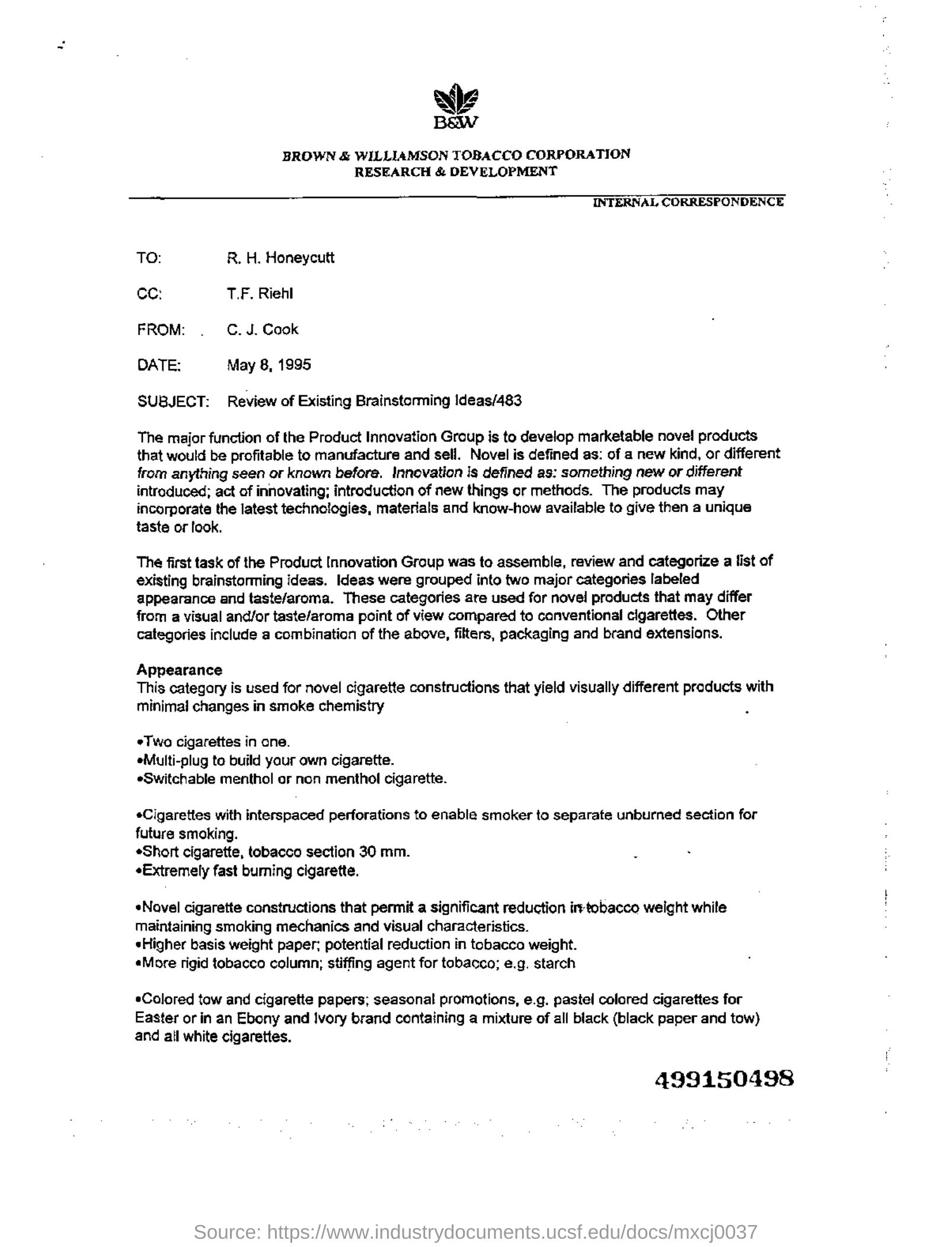
Verileri ön işleme
Document Question Answering görevi çok modlu bir görevdir ve her moddan gelen girdilerin modelin beklentilerine göre ön işlenmesini sağlamalısınız. Hem görüntü verilerini işleyebilen bir görüntü işleyiciyi hem de metin verilerini kodlayabilen bir belirteçleyiciyi içsel olarak birleştiren LayoutLMv2Processor'yi yükleyerek başlayalım.
>>> from transformers import AutoProcessor

>>> processor = AutoProcessor.from_pretrained(model_checkpoint)
Belge görüntülerini ön işleme
Öncelikle, işlemcinin image_processor bileşeninin yardımıyla model için belge görüntülerini hazırlayalım.
Varsayılan olarak, görüntü işlemci görüntüleri 224x224 boyutuna yeniden boyutlandırır, renk kanallarının doğru sıralamaya sahip olduğundan emin olur
ve kelimeleri ile normalize edilmiş sınırlayıcı kutuları (bounding box) elde etmek için tesseract ile OCR uygular. Bu öğreticide, bu varsayılanların tümü tam olarak ihtiyacımız olan şeylerdir.
Bir görüntü grubuna (batch) varsayılan görüntü işleme işlemlerini uygulayan ve OCR sonuçlarını döndüren bir fonksiyon yazın.
>>> image_processor = processor.image_processor


>>> def get_ocr_words_and_boxes(examples):
...     images = [image.convert("RGB") for image in examples["image"]]
...     encoded_inputs = image_processor(images)

...     examples["image"] = encoded_inputs.pixel_values
...     examples["words"] = encoded_inputs.words
...     examples["boxes"] = encoded_inputs.boxes

...     return examples
Bu ön işleme adımını tüm veri setine hızlı bir şekilde uygulamak için map kullanın.
>>> dataset_with_ocr = updated_dataset.map(get_ocr_words_and_boxes, batched=True, batch_size=2)Metin verilerini ön işleme
Görsellere OCR uygulandıktan sonra, modeli hazırlamak için veri setinin metin kısmını kodlamamız gerekir.
Bu işlem, önceki adımda elde ettiğimiz kelimeleri ve kutuları token düzeyinde input_ids, attention_mask, token_type_ids ve bbox olarak dönüştürmeyi içerir. Metni ön işlemek için işlemciden tokenizer kullanmamız gerekir.
>>> tokenizer = processor.tokenizerYukarıda bahsedilen ön işlemlerin yanı sıra, modele etiketleri de eklememiz gerekir. 🤗 Transformers'taki xxxForQuestionAnswering modellerinde etiketler, cevabın başlangıcındaki ve sonundaki token'ı gösteren start_positions ve end_positions değerlerinden oluşur.
Bununla başlayalım. Daha büyük bir listede (kelimeler listesi) bir alt liste (kelimelere ayrılmış cevap) bulabilen bir yardımcı işlev tanımlayın.
This function will take two lists as input, words_list and answer_list. It will then iterate over the words_list and check
if the current word in the words_list (words_list[i]) is equal to the first word of answer_list (answer_list[0]) and if
the sublist of words_list starting from the current word and of the same length as answer_list is equal to answer_list.
If this condition is true, it means that a match has been found, and the function will record the match, its starting index (idx),
and its ending index (idx + len(answer_list) - 1). If more than one match was found, the function will return only the first one.
If no match is found, the function returns (None, 0, and 0).
>>> def subfinder(words_list, answer_list):
...     matches = []
...     start_indices = []
...     end_indices = []
...     for idx, i in enumerate(range(len(words_list))):
...         if words_list[i] == answer_list[0] and words_list[i : i + len(answer_list)] == answer_list:
...             matches.append(answer_list)
...             start_indices.append(idx)
...             end_indices.append(idx + len(answer_list) - 1)
...     if matches:
...         return matches[0], start_indices[0], end_indices[0]
...     else:
...         return None, 0, 0
Bu fonksiyonun cevabın konumunu nasıl bulduğunu göstermek için bir örnekte kullanalım:
>>> example = dataset_with_ocr["train"][1]
>>> words = [word.lower() for word in example["words"]]
>>> match, word_idx_start, word_idx_end = subfinder(words, example["answer"].lower().split())
>>> print("Question: ", example["question"])
>>> print("Words:", words)
>>> print("Answer: ", example["answer"])
>>> print("start_index", word_idx_start)
>>> print("end_index", word_idx_end)
Question:  Who is in  cc in this letter?
Words: ['wie', 'baw', 'brown', '&', 'williamson', 'tobacco', 'corporation', 'research', '&', 'development', 'internal', 'correspondence', 'to:', 'r.', 'h.', 'honeycutt', 'ce:', 't.f.', 'riehl', 'from:', '.', 'c.j.', 'cook', 'date:', 'may', '8,', '1995', 'subject:', 'review', 'of', 'existing', 'brainstorming', 'ideas/483', 'the', 'major', 'function', 'of', 'the', 'product', 'innovation', 'graup', 'is', 'to', 'develop', 'marketable', 'nove!', 'products', 'that', 'would', 'be', 'profitable', 'to', 'manufacture', 'and', 'sell.', 'novel', 'is', 'defined', 'as:', 'of', 'a', 'new', 'kind,', 'or', 'different', 'from', 'anything', 'seen', 'or', 'known', 'before.', 'innovation', 'is', 'defined', 'as:', 'something', 'new', 'or', 'different', 'introduced;', 'act', 'of', 'innovating;', 'introduction', 'of', 'new', 'things', 'or', 'methods.', 'the', 'products', 'may', 'incorporate', 'the', 'latest', 'technologies,', 'materials', 'and', 'know-how', 'available', 'to', 'give', 'then', 'a', 'unique', 'taste', 'or', 'look.', 'the', 'first', 'task', 'of', 'the', 'product', 'innovation', 'group', 'was', 'to', 'assemble,', 'review', 'and', 'categorize', 'a', 'list', 'of', 'existing', 'brainstorming', 'ideas.', 'ideas', 'were', 'grouped', 'into', 'two', 'major', 'categories', 'labeled', 'appearance', 'and', 'taste/aroma.', 'these', 'categories', 'are', 'used', 'for', 'novel', 'products', 'that', 'may', 'differ', 'from', 'a', 'visual', 'and/or', 'taste/aroma', 'point', 'of', 'view', 'compared', 'to', 'canventional', 'cigarettes.', 'other', 'categories', 'include', 'a', 'combination', 'of', 'the', 'above,', 'filters,', 'packaging', 'and', 'brand', 'extensions.', 'appearance', 'this', 'category', 'is', 'used', 'for', 'novel', 'cigarette', 'constructions', 'that', 'yield', 'visually', 'different', 'products', 'with', 'minimal', 'changes', 'in', 'smoke', 'chemistry', 'two', 'cigarettes', 'in', 'cne.', 'emulti-plug', 'te', 'build', 'yaur', 'awn', 'cigarette.', 'eswitchable', 'menthol', 'or', 'non', 'menthol', 'cigarette.', '*cigarettes', 'with', 'interspaced', 'perforations', 'to', 'enable', 'smoker', 'to', 'separate', 'unburned', 'section', 'for', 'future', 'smoking.', '«short', 'cigarette,', 'tobacco', 'section', '30', 'mm.', '«extremely', 'fast', 'buming', 'cigarette.', '«novel', 'cigarette', 'constructions', 'that', 'permit', 'a', 'significant', 'reduction', 'iretobacco', 'weight', 'while', 'maintaining', 'smoking', 'mechanics', 'and', 'visual', 'characteristics.', 'higher', 'basis', 'weight', 'paper:', 'potential', 'reduction', 'in', 'tobacco', 'weight.', '«more', 'rigid', 'tobacco', 'column;', 'stiffing', 'agent', 'for', 'tobacco;', 'e.g.', 'starch', '*colored', 'tow', 'and', 'cigarette', 'papers;', 'seasonal', 'promotions,', 'e.g.', 'pastel', 'colored', 'cigarettes', 'for', 'easter', 'or', 'in', 'an', 'ebony', 'and', 'ivory', 'brand', 'containing', 'a', 'mixture', 'of', 'all', 'black', '(black', 'paper', 'and', 'tow)', 'and', 'ail', 'white', 'cigarettes.', '499150498']
Answer:  T.F. Riehl
start_index 17
end_index 18
Ancak örnekler kodlandıktan sonra, bu şekilde görüneceklerdir:
>>> encoding = tokenizer(example["question"], example["words"], example["boxes"])
>>> tokenizer.decode(encoding["input_ids"])
[CLS] who is in cc in this letter? [SEP] wie baw brown & williamson tobacco corporation research & development ...
Kodlanmış girdide cevabın konumunu bulmamız gerekecek.
token_type_ids, hangi tokenların sorunun, hangilerinin ise belgenin kelimelerinin parçası olduğunu bize söyler.tokenizer.cls_token_id, girdinin başındaki özel token'ı bulmanıza yardımcı olacaktır.word_ids, orijinalwordsiçinde bulunan cevabı, tam kodlanmış girdideki aynı cevaba eşleştirmeye ve cevabın kodlanmış girdideki başlangıç/bitiş konumunu belirlemeye yardımcı olur.
Bu düşünceyle, veri setindeki örneklerin bir partisini kodlamak için bir fonksiyon oluşturalım:
>>> def encode_dataset(examples, max_length=512):
...     questions = examples["question"]
...     words = examples["words"]
...     boxes = examples["boxes"]
...     answers = examples["answer"]

...     # encode the batch of examples and initialize the start_positions and end_positions
...     encoding = tokenizer(questions, words, boxes, max_length=max_length, padding="max_length", truncation=True)
...     start_positions = []
...     end_positions = []

...     # loop through the examples in the batch
...     for i in range(len(questions)):
...         cls_index = encoding["input_ids"][i].index(tokenizer.cls_token_id)

...         # find the position of the answer in example's words
...         words_example = [word.lower() for word in words[i]]
...         answer = answers[i]
...         match, word_idx_start, word_idx_end = subfinder(words_example, answer.lower().split())

...         if match:
...             # if match is found, use `token_type_ids` to find where words start in the encoding
...             token_type_ids = encoding["token_type_ids"][i]
...             token_start_index = 0
...             while token_type_ids[token_start_index] != 1:
...                 token_start_index += 1

...             token_end_index = len(encoding["input_ids"][i]) - 1
...             while token_type_ids[token_end_index] != 1:
...                 token_end_index -= 1

...             word_ids = encoding.word_ids(i)[token_start_index : token_end_index + 1]
...             start_position = cls_index
...             end_position = cls_index

...             # loop over word_ids and increase `token_start_index` until it matches the answer position in words
...             # once it matches, save the `token_start_index` as the `start_position` of the answer in the encoding
...             for id in word_ids:
...                 if id == word_idx_start:
...                     start_position = token_start_index
...                 else:
...                     token_start_index += 1

...             # similarly loop over `word_ids` starting from the end to find the `end_position` of the answer
...             for id in word_ids[::-1]:
...                 if id == word_idx_end:
...                     end_position = token_end_index
...                 else:
...                     token_end_index -= 1

...             start_positions.append(start_position)
...             end_positions.append(end_position)

...         else:
...             start_positions.append(cls_index)
...             end_positions.append(cls_index)

...     encoding["image"] = examples["image"]
...     encoding["start_positions"] = start_positions
...     encoding["end_positions"] = end_positions

...     return encoding
Bu ön işleme fonksiyonuna sahip olduğumuza göre, tüm veri setini kodlayabiliriz:
>>> encoded_train_dataset = dataset_with_ocr["train"].map(
...     encode_dataset, batched=True, batch_size=2, remove_columns=dataset_with_ocr["train"].column_names
... )
>>> encoded_test_dataset = dataset_with_ocr["test"].map(
...     encode_dataset, batched=True, batch_size=2, remove_columns=dataset_with_ocr["test"].column_names
... )
Kodlanmış veri setinin özelliklerinin nasıl göründüğüne bakalım:
>>> encoded_train_dataset.features
{'image': Sequence(feature=Sequence(feature=Sequence(feature=Value(dtype='uint8', id=None), length=-1, id=None), length=-1, id=None), length=-1, id=None),
 'input_ids': Sequence(feature=Value(dtype='int32', id=None), length=-1, id=None),
 'token_type_ids': Sequence(feature=Value(dtype='int8', id=None), length=-1, id=None),
 'attention_mask': Sequence(feature=Value(dtype='int8', id=None), length=-1, id=None),
 'bbox': Sequence(feature=Sequence(feature=Value(dtype='int64', id=None), length=-1, id=None), length=-1, id=None),
 'start_positions': Value(dtype='int64', id=None),
 'end_positions': Value(dtype='int64', id=None)}
Değerlendirme
Belge soru-cevap için değerlendirme, önemli miktarda son işleme gerektirir. Süreci çok uzatmamak için bu kılavuzda değerlendirme adımı atlanır. Trainer, eğitim sırasında değerlendirme kaybını hesaplamaya devam eder, bu sayede modelinizin performansıyla ilgili tamamen bilgi eksikliği yaşamazsınız. Çıkarımsal soru-cevap genellikle F1/tam eşleşme ile değerlendirilir. Kendiniz uygulamak isterseniz ilham almak için Hugging Face kursunun Soru-Cevap bölümüne göz atabilirsiniz.
Eğit
Tebrikler! Bu rehberin en zorlu kısmını başarıyla tamamladınız ve artık kendi modelinizi eğitmeye hazırsınız. Eğitim aşağıdaki adımları içerir:
- Modeli, ön işlemede kullanılan aynı kontrol noktasıyla AutoModelForDocumentQuestionAnswering kullanarak yükleyin.
- Eğitim hiperparametrelerinizi TrainingArguments içinde tanımlayın.
- Örnekleri toplu halde işleyecek bir fonksiyon tanımlayın; burada DefaultDataCollator gayet yeterli olacaktır.
- Eğitim argümanlarını, model, veri seti ve veri toplayıcıyla birlikte Trainer'a iletin.
- Modelinizi ince ayar yapmak için train() çağrın.
>>> from transformers import AutoModelForDocumentQuestionAnswering

>>> model = AutoModelForDocumentQuestionAnswering.from_pretrained(model_checkpoint)
TrainingArguments içinde modelinizi nereye kaydedeceğinizi belirtmek için output_dir kullanın ve hiperparametreleri uygun gördüğünüz şekilde yapılandırın.
Modelinizi toplulukla paylaşmak istiyorsanız push_to_hub değerini True olarak ayarlayın (modelinizi yüklemek için Hugging Face hesabına giriş yapmış olmanız gerekir).
Bu durumda output_dir, model kontrol noktanızın yükleneceği repoyu ad olarak da kullanılır.
>>> from transformers import TrainingArguments

>>> # REPLACE THIS WITH YOUR REPO ID
>>> repo_id = "MariaK/layoutlmv2-base-uncased_finetuned_docvqa"

>>> training_args = TrainingArguments(
...     output_dir=repo_id,
...     per_device_train_batch_size=4,
...     num_train_epochs=20,
...     save_steps=200,
...     logging_steps=50,
...     eval_strategy="steps",
...     learning_rate=5e-5,
...     save_total_limit=2,
...     remove_unused_columns=False,
...     push_to_hub=True,
... )
Örnekleri toplu olarak gruplamak için basit bir veri toplayıcı (data collator) tanımlayın.
>>> from transformers import DefaultDataCollator

>>> data_collator = DefaultDataCollator()
Son olarak, her şeyi bir araya getirin ve train() çağrısını yapın:
>>> from transformers import Trainer

>>> trainer = Trainer(
...     model=model,
...     args=training_args,
...     data_collator=data_collator,
...     train_dataset=encoded_train_dataset,
...     eval_dataset=encoded_test_dataset,
...     processing_class=processor,
... )

>>> trainer.train()
Son modeli 🤗 Hub'a eklemek için bir model kartı oluşturun ve push_to_hub çağrısını yapın:
>>> trainer.create_model_card()
>>> trainer.push_to_hub()
Çıkarım
Artık bir LayoutLMv2 modelini ince ayarladınız ve 🤗 Hub'a yüklediniz; bu modeli çıkarım (inference) için kullanabilirsiniz. İnce ayarlanmış modelinizi çıkarım için denemenin en basit yolu, onu bir Pipeline içinde kullanmaktır.
Örnek olarak şunu ele alalım:
>>> example = dataset["test"][2]
>>> question = example["query"]["en"]
>>> image = example["image"]
>>> print(question)
>>> print(example["answers"])
'Who is ‘presiding’ TRRF GENERAL SESSION (PART 1)?'
['TRRF Vice President', 'lee a. waller']
Ardından, modelinizle belge soru-cevap için bir pipeline örneği oluşturun ve görsel + soru kombinasyonunu ona iletin.
>>> from transformers import pipeline

>>> qa_pipeline = pipeline("document-question-answering", model="MariaK/layoutlmv2-base-uncased_finetuned_docvqa")
>>> qa_pipeline(image, question)
[{'score': 0.9949808120727539,
  'answer': 'Lee A. Waller',
  'start': 55,
  'end': 57}]
İsterseniz, pipeline sonuçlarını manuel olarak da yeniden üretebilirsiniz:
- Bir görüntü ve bir soru alın ve bunları, modelinizden gelen processor kullanarak modele hazırlayın.
- Sonucu veya ön işleme adımını modele iletin.
- Model, cevabın başlangıcındaki ve sonundaki token'ları gösteren
start_logitsveend_logitsdeğerlerini döndürür. İkisinin de şekli (batch_size, sequence_length)'dir. start_logitsveend_logitsdizilerinin son boyutunda argmax alarak tahministart_idxveend_idxdeğerlerini elde edin.- Cevabı tokenizer ile çözümlen.
>>> import torch
>>> from transformers import AutoProcessor
>>> from transformers import AutoModelForDocumentQuestionAnswering

>>> processor = AutoProcessor.from_pretrained("MariaK/layoutlmv2-base-uncased_finetuned_docvqa")
>>> model = AutoModelForDocumentQuestionAnswering.from_pretrained("MariaK/layoutlmv2-base-uncased_finetuned_docvqa")

>>> with torch.no_grad():
...     encoding = processor(image.convert("RGB"), question, return_tensors="pt")
...     outputs = model(**encoding)
...     start_logits = outputs.start_logits
...     end_logits = outputs.end_logits
...     predicted_start_idx = start_logits.argmax(-1).item()
...     predicted_end_idx = end_logits.argmax(-1).item()

>>> processor.tokenizer.decode(encoding.input_ids.squeeze()[predicted_start_idx : predicted_end_idx + 1])
'lee a. waller'